
Tableau Server Administrator Certification: What It Tests, What It Costs and How to Prepare
The Tableau Server Administrator certification is Salesforce's credential for the person who installs, secures and keeps a single-machine Tableau Server running. The exam has 55 questions, a 90-minute limit, a 64 percent pass mark and a USD 200 fee as of October 2026, and its five domains lean heavily toward day-to-day administration. If you already run a Tableau Server for a living, a timed Tableau Server Administrator practice exam will tell you within an hour which of those five domains still need work and which you can leave alone.
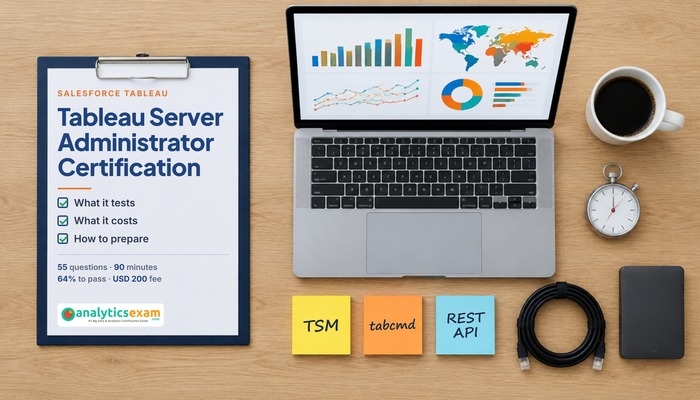
What does the Tableau Server Administrator credential actually certify?
Salesforce describes the audience as people with a comprehensive understanding of Tableau Server in a single-machine environment, typically with at least six months of applying that knowledge in the product. That scoping matters. The exam is not about multi-node clusters, external repositories or container deployments; it is about one server, installed and run properly, with the people, sites, projects, permissions, schedules and backups that a working deployment needs.
In practice the credential says you can take a licensed Tableau Server package, put it on a supported operating system, choose an identity store, enable SSL, create sites and projects, map license types to site roles, design permissions that do not leak data, keep extracts refreshed on a schedule, read the built-in administrative views, package log files when something breaks, and upgrade the whole thing without losing content. Salesforce currently tests on Tableau 2022.3, so the Tableau Services Manager (TSM) era of administration is assumed throughout; the older tabadmin commands are not what the questions are written around.
This is a product-bound credential with no prerequisite, which puts it in a different category from the vendor-neutral certifications a systems administrator might already hold. Nobody asks you to prove Linux or Windows skills first. The exam simply assumes that someone who has run Tableau Server for half a year has picked up what it needs from the host operating system along the way.
Which administrators benefit most, and who is better served by another Tableau credential?
Three kinds of people get the most from this exam. The first is the accidental administrator: the analyst or BI developer who installed Tableau Server because nobody else would and now owns it. For that person the exam outline is a checklist of everything they have been meaning to learn properly, from process topology to permission inheritance. The second is the infrastructure or platform engineer who has been handed Tableau Server as one more application in a wider estate and wants a structured way to learn its specifics. The third is the consultant or partner who sets up Tableau Server for clients and needs a credential that clients recognise.
The exam is a poor fit for someone whose work is building dashboards. Visual analytics, calculations, table calculations and dashboard design are the territory of Salesforce's Tableau Desktop and Data Analyst credentials, and almost none of that appears on the server administrator outline beyond a short section on what end users can do once content is published. It is also a weak fit for an organisation that has moved entirely to Tableau Cloud, because the installation, process, port and upgrade material that makes up most of this exam simply does not exist for a hosted deployment. If your Tableau runs on hardware you control, whether on-premises or on virtual machines in a cloud account, this is the right credential. If Salesforce hosts it for you, look elsewhere.
One more group should wait rather than skip: people with fewer than six months on a real server. The questions are scenario-led, and candidates who have only read the documentation tend to recognise the terms without being able to pick the correct action from four plausible ones. A few months of owning an actual install, even a small one, changes that.
Exam format in October 2026: questions, time limit, fee and pass mark
The facts below come from Salesforce's own Tableau Server Administrator exam guide, checked on 29 October 2026. Prices are as Salesforce publishes them and exclude local taxes.
| Item | Detail |
|---|---|
| Questions | 55 on the form: 50 scored multiple-choice and multiple-select items plus up to five unscored items |
| Time limit | 90 minutes |
| Pass mark | 64 percent |
| Registration fee | USD 200 (JPY 30,000 in Japan), plus applicable taxes |
| Retake fee | USD 100 (JPY 15,000), plus applicable taxes |
| Product version | Tableau 2022.3 |
| Delivery | Proctored, at a testing centre or online; no reference material allowed |
| Prerequisite | None |
A few details in that table deserve a closer look. Ninety minutes for 55 items is a little over 98 seconds per question, which is comfortable for recall questions and tight for the scenario questions that ask you to work out why a subscription did not send or which permission rule wins. The unscored questions are mixed in at random and have no effect on your result, so you cannot identify and skip them; assume each item is scored. The 64 percent pass mark means you can miss roughly 18 of the 50 scored items, which is more forgiving than it sounds only if your knowledge is even across the domains. A candidate who is strong on administration and weak on installation can still fall short, because installation and configuration alone are a quarter of the paper.
The retake fee is half the registration fee, and Salesforce's standard retake rules apply, so a failed first attempt costs you USD 100 and some waiting time rather than a second full fee. Even so, one attempt is the sensible plan. Salesforce also requires a yearly maintenance badge on Trailhead to keep the certification active, which is free but easy to forget; put the due date in your calendar the day you pass.
Which of the five domains carry the most weight?
The exam guide splits the content into five domains. Administration is the largest at 36 percent, followed by Install and Configure at 26 percent, Preparation at 20 percent, Troubleshooting at 12 percent and Migration and Upgrade at 6 percent. Together the two biggest domains are 62 percent of the exam, so the people who pass comfortably are the ones who can both set a server up and run it afterwards, not the ones who have memorised the hardware requirements table.
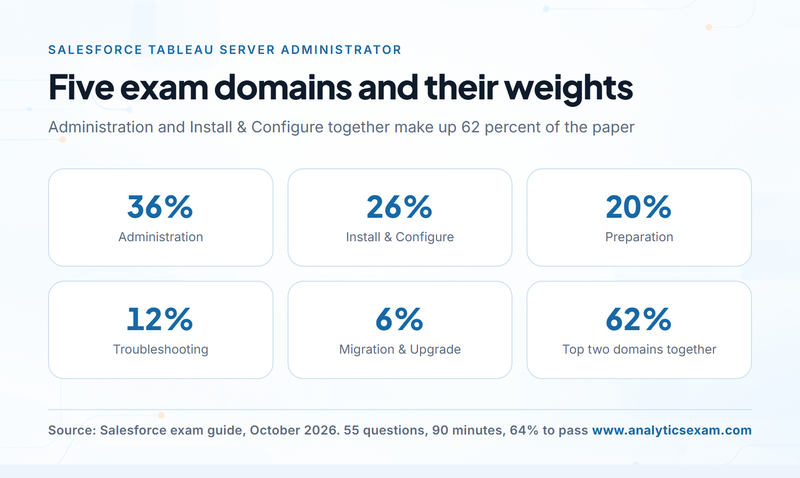
Administration, at 36 percent, is the daily work: maintaining data connections, creating schedules, managing subscriptions, running a backup and restore, cleaning up old log and extract files, adding, removing and deactivating users, updating licenses, starting and stopping the server, and using TSM, tabcmd and the REST API to do all of that from a command line or a script. It also covers the monitoring side: server status, email alerts, data-driven alerts, the built-in administrative views, custom admin views on the repository, performance recordings, nested projects and site administration. A final slice contrasts what an end user can do, such as web authoring, sharing views, publishing data sources and certifying them, with what only a server administrator can do.
Install and Configure, at 26 percent, starts with the install path and gateway port and then spends most of its weight on identity and security. You need to know the difference between a local identity store and Active Directory, how trusted tickets, SAML, Kerberos and OpenID Connect each fit, what the automatic login options change, how SSL is set up, and what a silent install looks like. The configuration half covers cache settings, process distribution, email alerts, site options, user and storage quotas, subscriptions and project settings, and then the security model itself: site, project, group, user, data source and workbook level, and the consequences of Allow versus Deny versus None.
Preparation, at 20 percent, is the planning knowledge: client and server components and how they talk to each other, where to find the current version and release notes, the RAM, CPU and disk minimums, supported operating systems and browsers, SMTP and port considerations, the case for a dedicated server, user-based licensing and how license types map to site roles, every TSM and Tableau Server process with its default count, what changes in distributed and high-availability layouts, and the data-source questions around ports, drivers, file versus relational versus cube sources, and extract versus live connections. Troubleshooting (12 percent) covers third-party cookie requirements, resetting passwords for a Tableau user or the Run As service account, packaging logs for support, validating site resources with TSM, rebuilding the search index, maintenance analysis reports and opening a support case. Migration and Upgrade (6 percent) asks about the upgrade process, when and why to do a clean reinstall, moving to different hardware and backwards compatibility.
Where do seasoned server owners drop points?
People who struggle here are rarely short of server knowledge in general. They are the ones who know their own server very well and the product's design less well. Four areas account for most of the surprises.
Permissions. Tableau's security model evaluates site role, then project, group and user rules, and a single Deny at any level beats an Allow elsewhere. Administrators who have always worked around a confusing permission by granting a wider role rather than fixing the rule tend to guess wrong on questions that ask which capability a user ends up with. Learn the evaluation order and the effect of locking permissions to a project, and practise reading a permissions grid cold.
Processes and topology. You are expected to name each process, say what it does, know its default instance count on a fresh install and understand which ones can run more than once. People who installed the server once with the defaults and never opened the TSM status page struggle here. Spend an afternoon with the processes reference and the TSM topology commands.
Licensing and site roles. The mapping from Creator, Explorer and Viewer licenses to site roles, and which roles can publish, administer a site or be a server administrator, is tested more than its share of the outline suggests. The common mistake is to treat license type and site role as the same thing.
Command-line tools. Questions that describe a task and ask whether it belongs to TSM, tabcmd or the REST API catch administrators who do everything through the browser. Backups, restores, topology, configuration keys and maintenance belong to TSM; content tasks such as publishing, exporting a view or managing users and groups belong to tabcmd; anything you would automate from another application belongs to the REST API. Knowing that split answers a surprising number of items.
How do you prepare in six weeks on a single-machine install?
Because the exam is scoped to a single machine, a complete preparation environment fits on one virtual machine with a trial license. The plan below assumes about five hours a week and a server you are allowed to break.
First fortnight: preparation and installation. Read the planning sections of the Tableau Server administrator guide, then install the server twice: once interactively, once silently from a configuration file. Record the install path, the gateway port, the identity store you chose and every process and its count. Enable SSL with a self-signed certificate so you have seen the steps. Install the database drivers for two data sources you use at work and note the ports they need.
Weeks three and four: configuration, users and security. Create two sites and a nested project structure in each. Add users three ways: individually, from a CSV, and from a directory if you have one. Assign every license type and site role at least once and write down what each user can and cannot do. Then build a permission scheme on purpose: lock permissions on one project, leave another unlocked, set Deny rules on a group and confirm the effective capabilities through the permissions dialog. Configure SMTP, email alerts and subscriptions, and set user and storage quotas on a site.
Week five: administration and troubleshooting. Create extract refresh schedules and subscriptions, publish a data source and certify it, set a data-driven alert and watch it fire. Take a full backup with TSM, restore it, and run a cleanup. Script the same user export with tabcmd and with the REST API. Open every built-in administrative view and build one custom view on the repository. Then break things: reset a user password, change the Run As service account password, package the logs, rebuild the search index and validate site resources.
Week six: upgrade and rehearsal. Upgrade your server to a newer maintenance release and read the backwards compatibility rules, then do a clean reinstall and restore your backup onto it, which is also the migration exercise. Finish with two timed sets of 55 questions. Mark every wrong answer against the five domains and spend the last evening on the domain that lost you the most points, not the one you enjoy. The full objective list is reproduced on the syllabus page on this site if you prefer it in one place.
Tableau Cloud, Desktop or Server Administrator: which certification fits?
Salesforce runs several Tableau certifications, and choosing the wrong one wastes a fee. The Desktop credentials test analysis and visualisation skills in Tableau Desktop; the Data Analyst credential adds Tableau Prep and the publishing workflow; the Consultant and Architect credentials sit above the administrator level and assume broader design and multi-environment experience. The Server Administrator exam is the only one whose outline is almost entirely about installing, configuring and operating the server itself.
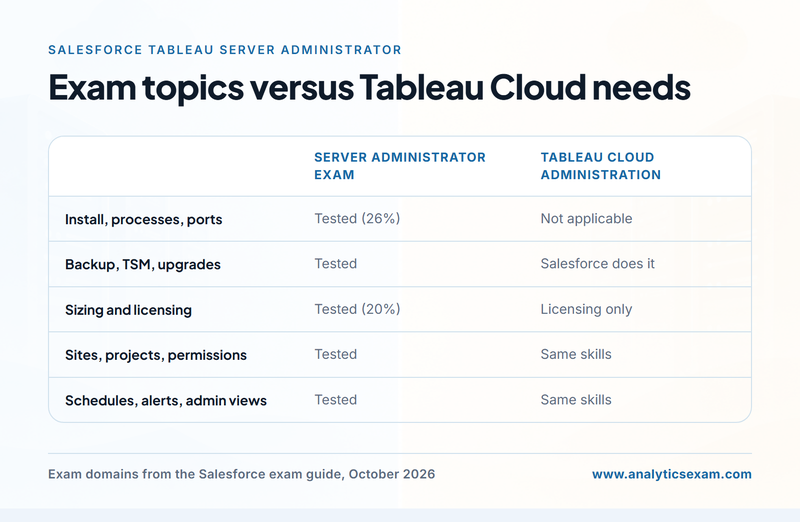
Against a Tableau Cloud administration role the difference is practical rather than academic. On Tableau Cloud there is no installation, no process topology, no TSM, no backup, no upgrade and no hardware sizing, which removes something like two thirds of this exam's content. What survives is the shared material: sites, projects, users, groups, license types, site roles, permissions, schedules, subscriptions and the administrative views. If your organisation runs both, the Server Administrator credential covers the harder half and most of the shared half, which is why many Tableau Cloud administrators still sit it.
Against general infrastructure certifications it is narrower and cheaper. A platform engineer who holds an operating-system or cloud credential will find the host-level questions easy and the product-level ones new; the exam fee of USD 200 buys a credential that proves the product-level part, and that is usually what a hiring manager for a Tableau role actually wants to see.
What does the credential change in your career?
Tableau Server administration is a role that organisations tend to under-staff until something breaks, and the person who can fix it quickly earns a lot of goodwill. The certification does three concrete things. It gives an internal administrator a recognised credential for a job title that often grew out of another role, which helps when the role is formalised or the salary band is reviewed. It gives a consultant or partner a line on a proposal that clients check. And it gives an infrastructure engineer a way into analytics platform work without first becoming a dashboard author.
Salary and demand vary by country and by how large the Tableau estate is, so no single figure is honest across the 200-plus countries this site's readers come from. What is consistent is that job advertisements for Tableau Server administrators, BI platform engineers and analytics platform leads list the exact topics on this exam, from identity store configuration and SSL to extract scheduling and the REST API, and a credential that covers all of them shortens the screening conversation. Pair it with the Trailhead maintenance badge each year and it stays current without a second exam.
Should you pay USD 200 for it?
If you run a Tableau Server today, yes: USD 200 and six weeks of structured study will fill the gaps that owning one server by habit leaves open, and the credential outlives the study. If your Tableau lives entirely in Tableau Cloud, the shared administration material is useful but you will pay to learn installation and upgrade content you cannot use; a Tableau Cloud focused path is the better buy. If you build dashboards and never touch the server, choose a Desktop or Data Analyst credential instead.
For the administrator who decides to go ahead, the order of work is simple. Read the exam guide, build the single-machine lab, work through the five domains in weight order, and sit one timed practice set early enough that the result can still change your study plan. Candidates who do that rarely need the retake fee.
Frequently Asked Questions
How long is the Tableau Server Administrator exam and what does the question count include?
The exam form holds 55 questions: 50 scored items in multiple-choice and multiple-select form, and as many as five unscored ones that Salesforce mixes in at random to gather performance data. You have 90 minutes, which works out to a little over 98 seconds per question, and no reference material is allowed during the exam.
What is the pass mark and the fee for the Tableau Server Administrator exam?
Salesforce's guide puts the pass mark at 64 percent. The registration fee is USD 200 and the retake fee is USD 100, both plus applicable taxes, with JPY 30,000 and JPY 15,000 equivalents published for Japan. These are the figures published as of October 2026; check the guide before you book.
Which domain carries the most weight on the Tableau Server Administrator exam?
Administration is the largest domain at 36 percent, covering schedules, subscriptions, backup and restore, users, licenses, TSM, tabcmd, the REST API and the administrative views. Install and Configure is next with 26 percent, then Preparation (20), Troubleshooting (12) and Migration and Upgrade (6).
Can I prepare for the Tableau Server Administrator exam without a multi-node cluster?
Yes. Salesforce scopes the exam to a single-machine environment, so one virtual machine with a trial license is a complete lab. Use it to install the server twice, configure identity and SSL, build sites, projects and permissions, run backups and an upgrade, and practise the TSM, tabcmd and REST API tasks the outline lists.
Is the Tableau Server Administrator certification still relevant if my company uses Tableau Cloud?
Partly. The shared material (sites and projects, user and group management, licensing and site roles, permission rules, refresh schedules, subscriptions and the admin views) applies to Tableau Cloud as well, but installation, process topology, TSM, backups, upgrades and hardware sizing do not. If your Tableau runs only in Tableau Cloud, a Cloud-focused path is a better use of the fee.
Which Tableau version does the Server Administrator exam test on?
Salesforce's exam guide states that the exam is currently testing on Tableau 2022.3. The questions therefore assume Tableau Services Manager (TSM) for installation, topology, backups and configuration rather than the older tabadmin tooling. Features introduced after 2022.3 are not what the questions are written around.
How do I keep the Tableau Server Administrator certification active after passing?
Salesforce requires you to complete the Tableau certification maintenance badge on Trailhead once a year. The badge is free, but if you miss the due date the certification expires and you would need to sit the exam again, so record the date and verify your certification status on Trailhead each year.


